A NATIVE WORKSPACE FOR YOUR CODING AGENTS

One terminal.
Many agents.

Hive is an open-source terminal multiplexer for AI coding agents.
Run Claude Code, Codex, Gemini CLI and OpenCode side by side, in the terminal you already love.

Linux · macOS · Windows Open source · MIT Built to stay local

YOUR AGENTS. ONE PLACE.Select a session. Make yourself at home.
hive / ~/projects/atlasILLUSTRATIVE PREVIEW
Frontend / Claude Code

$hive new claude -l Frontend

Help me simplify the navigation component.

The navigation can be smaller without losing its keyboard behavior.

src/components/navigation.tsxEXAMPLE
export function Navigation() {
  return (
    <nav aria-label="Main navigation">
      <NavigationLinks />
    </nav>
  );
}

One component. Clear focus states. Familiar HTML.

Your terminal. Your next move.

hived connected · 3 sessionsctrlspaceleader
Claude Code selected · Illustrative terminal preview

BRING YOUR OWN AGENT

Claude CodeCodexGemini CLIOpenCode Your command

Your tools, installed separately. Hive gives them a terminal.

LESS FRICTION. MORE FLOW.

Less terminal management.
More time in the work.

Native processes. Familiar commands.
every feature in detail

01

Your agents. As they are.

Claude Code, Codex, Gemini CLI, OpenCode, truss and twenty more. Hive recognises the agent, even one started from a shell, and shows whether it is working, needs you, or is done. Its prompts and permissions stay intact.

REAL PTYS · LIVE AGENT STATUS
02

Leave the terminal. Keep the session.

The daemon owns the process. Detach from Hive or close its frontend, and your agent stays running. Open Hive again to pick up the live session.

DETACH · REATTACH · CONTINUE
03

Terminal first.

Click + new and you get a terminal. Type claude or codex to start an agent, cd anywhere first. A leader key handles Hive commands, tmux-style splits and tabs keep several agents in view, and the mouse works too.

CTRL+SPACE · SPLITS · TABS
04

Every project in its place.

Each repository you work in is a space with its own tabs, and a terminal follows you when you cd into another repo. Ctrl+Space C opens a terminal in its own worktree, so two agents never edit the same checkout.

SPACES · BRANCHES · WORKTREES
05

Find anything in a keystroke.

A fuzzy command palette for every action, session and workspace. Rebind any key, pick a theme, and it still works in 16 colours or plain ASCII.

PALETTE · KEYMAPS · THEMES
06

Survives the bumps.

The interface reconnects on its own if the daemon restarts. Open a session in two windows: one types, the other watches, and taking over is explicit.

RECONNECT · OBSERVE · TAKE OVER

MORE THAN A MULTIPLEXER

Your tools,
beside your agents.

Optional integrations. Off by default,
every option explained

Obsidian notes

Ctrl+Space N

Open your repository's vault beside your agents in Hive's own notes app: a note tree, rendered markdown, wikilinks, backlinks and search, with o to jump to the note in Obsidian. With journaling on, Hive appends “claude finished in #3 api (main)” to today's daily note, so your vault keeps a log of what your agents did.

[integrations.obsidian]

Review changes

Ctrl+Space G

lazygit, tig or git diff in a split beside the agent, opened in the agent's own directory or worktree. See what it changed without leaving Hive.

[integrations.review]

Watch the CI checks of the session's branch with the GitHub CLI, live, next to the agent that pushed it.

[integrations.github]

Project tasks

Ctrl+Space T

Pick a just, npm, make or cargo task from the project and run it beside the agent: the dev server, the tests, the linter.

[integrations.tasks]

A notification when an agent you aren't looking at finishes or needs your input. Walk away; Hive calls you back.

[integrations.desktop_notify]

Git status

sidebar

Changed files and commits ahead or behind under every repository space, e.g. main ~3 ↑2. Know which project has uncommitted agent work at a glance.

[integrations.git_status]

Usage and cost

Ctrl+Space U

Token usage and estimated cost of your agents in a pane, live, via ccusage or any tool you choose. Agents keep their own logs; Hive puts the numbers beside the work.

[integrations.usage]

Layouts

Ctrl+Space L

Name a set of panes once, say Claude, the dev server and a terminal, and open them together in a new tab. A layout can belong to a space and opens there without asking.

[layouts.<name>]
# ~/.config/hive/config.toml
[integrations.obsidian]
enabled = true
journal = true        # log agent activity to today's note

THE REAL THING

What it looks like.

Captured from a live session.
Spaces on the left, tabs on top.

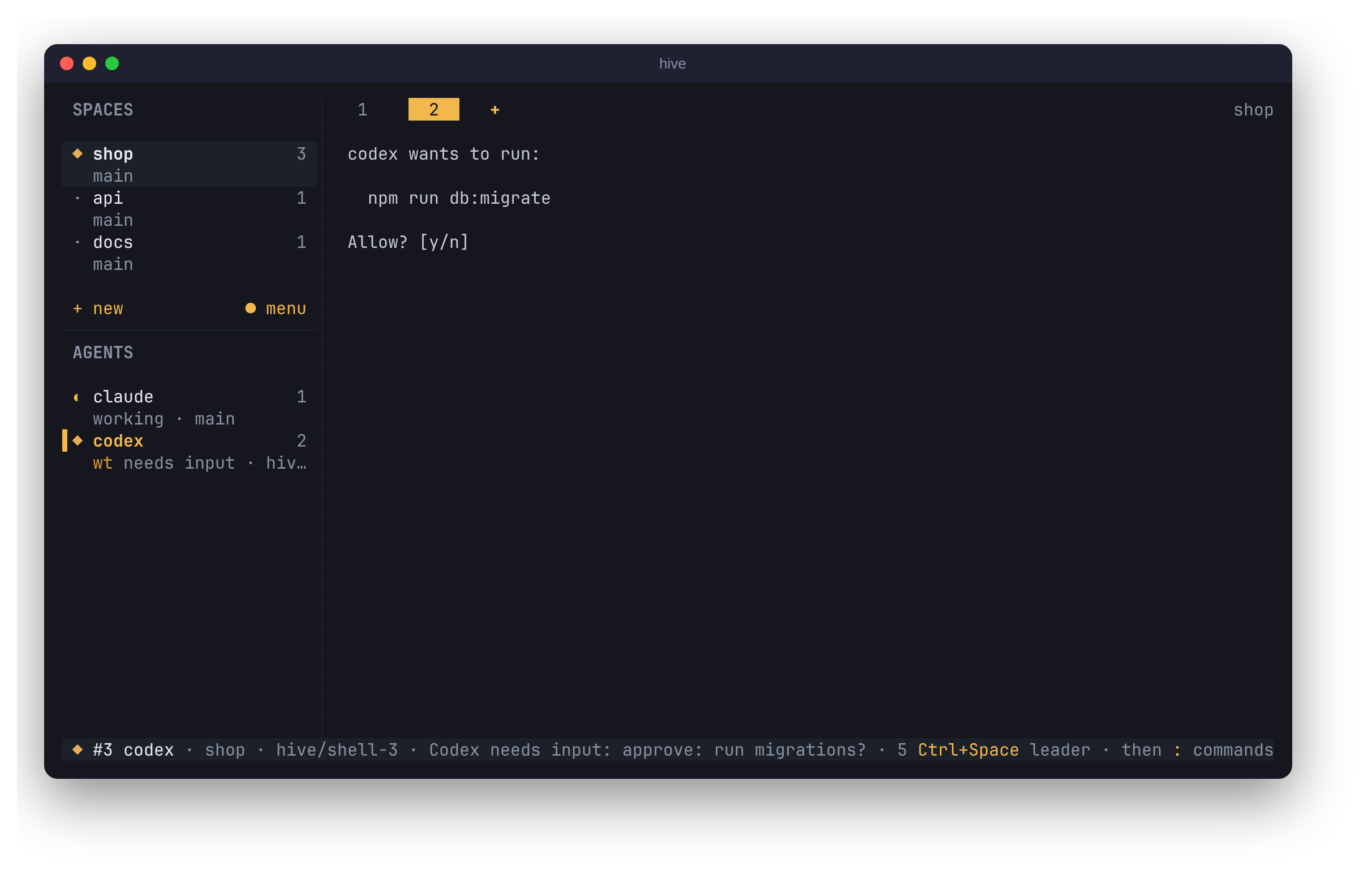
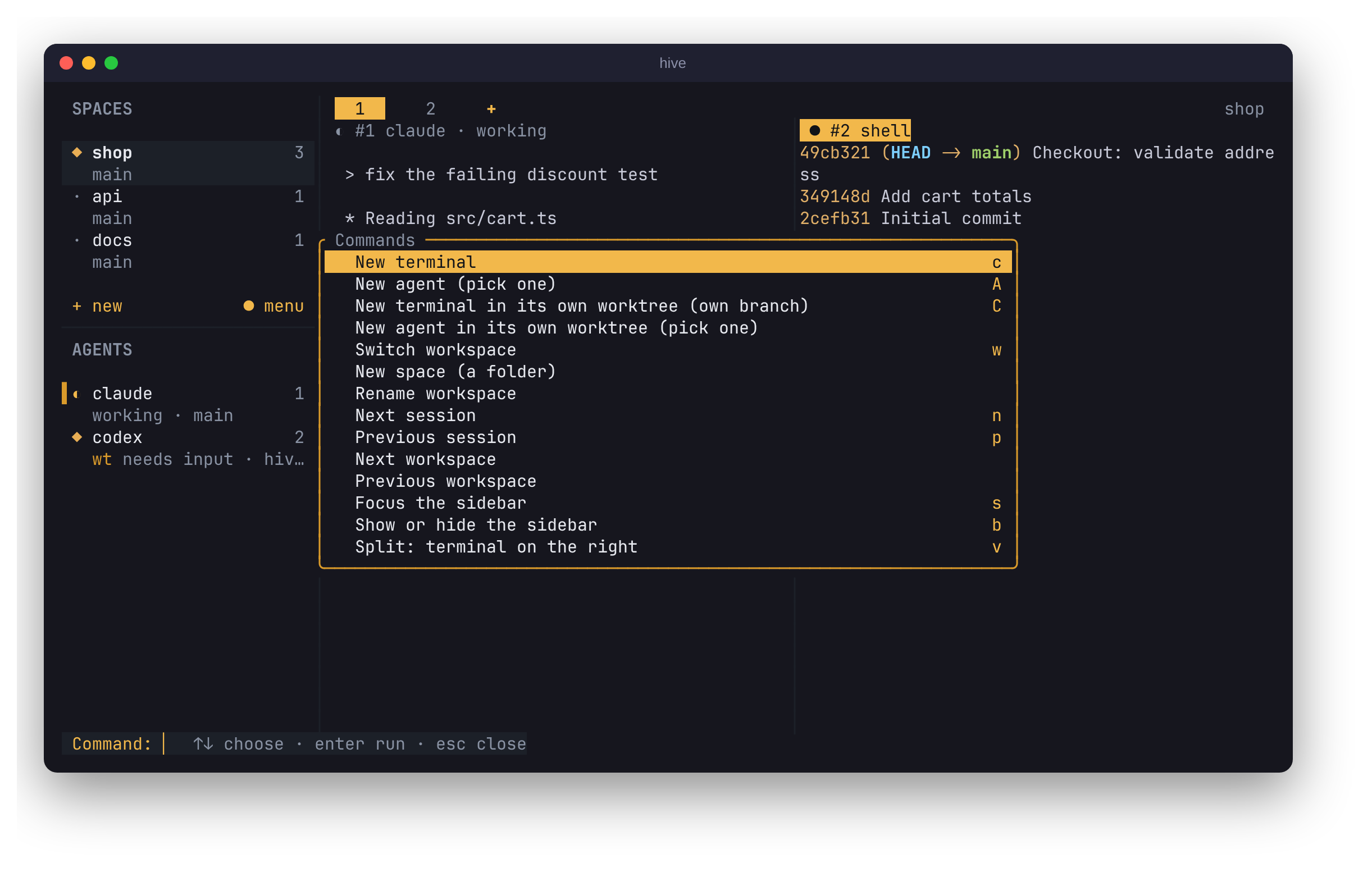
Spaces, a worktree agent waiting for approval, detach and reattach. Recorded in a real Hive; the agents' output is scripted for the demo.
Codex in its own worktree, waiting for approval
The command palette: Ctrl+Space :

LOCAL BY DESIGN

Close the window.
Keep the momentum.

Hive is a client. hived is the foundation. The daemon owns your agent process, its terminal, and its screen state. Your frontend just connects.

Sessions last while the daemon is alive. Stopping it or rebooting ends the running processes.

ON YOUR MACHINE local
hiveRender · input · resizeCLIENT
Unix domain socket
hivedProcesses · PTYs · terminal stateDAEMON
Real interactive terminal
your agentThe CLI you already knowPROCESS

No browser runtime. No Hive cloud account.

MAKE ROOM FOR YOUR AGENTS

Your terminal. Your platform.

v0.5.11 RELEASED
v0.5.11 · LINUX
ONE COMMAND. YOUR TERMINAL.

Hive for Linux

bash / sh

Static binaries for x86_64 and ARM64. The installer verifies a SHA-256 checksum and puts hive and hived in ~/.local/bin.

curl -fsSL https://github.com/jrh89/hive/releases/latest/download/install.sh | sh

The command is all you need: it downloads, verifies and installs both binaries. The download link is only for installing by hand. Set HIVE_INSTALL_DIR to install elsewhere, then run hive doctor to check your setup.

Install with npm, Bun, Homebrew, or pacman

Or build from source Rust 1.89+

Build from a checkout of Hive, then launch the agent you already use.

Linux, macOS or WindowsRust 1.89+Your agent CLI
01

Build Hive

Clone the repository and build:

git clone https://github.com/jrh89/hive && cd hive && cargo build --release

Keep hive and hived together in target/release/.

02

Bring an agent

Start with Codex, or swap in claude.

./target/release/hive new codex

Your installed CLI. Its own prompts and permissions.

03

Leave. Come back.

Ctrl + Space, then d detaches.

./target/release/hive

Reopen Hive to access your running sessions.

Sessions stay running while the daemon is alive.What’s next

A FOUNDATION, THEN A WORKSPACE

Built in the right order.

Reliability first, then room for your agents, then the polish to run many of them at once.

WORKING TODAY

Many agents. One view.

Real PTYs, a session sidebar, switching, labels, detach and reattach, automatic reconnection, and explicit control when several windows share a session.

WORKING TODAY

Room for every project

Workspaces, live Git branches, optional worktree isolation, a command palette, themes, and configurable keys.

RELEASED · v0.3.0

Many agents at a glance

Agent status, split panes and tabs, a clickable sidebar of spaces and agents, Alt-arrow navigation, optional review, task and notification integrations, and hive update.

RELEASED · v0.5.11

Everywhere, terminal first

macOS and Windows binaries. New opens a terminal, spaces follow your cd, worktree terminals keep agents apart, right-click menus, layouts and seven integrations. Full changelog

A FEW DETAILS

Good questions.

Is Hive ready to use?

Yes, on Linux, macOS and Windows. Hive is young but complete: terminals and agents in split panes and tabs, live agent status, detach and reattach, automatic reconnection, spaces that follow your cd, Git worktrees, a command palette, themes and configurable keys. It is tested with real terminals in CI on all three platforms. Version 0.5.11 ships prebuilt binaries and a one-line installer; hive update upgrades in place.

Which agents can I run?

Hive knows over twenty agents, including Claude Code, Codex, Gemini CLI, OpenCode, Copilot, Cursor Agent and truss, and offers the ones you have installed. You can configure other commands in TOML. Install and authenticate each agent separately; Hive runs its CLI and preserves its permission system.

What happens when I close Hive?

Closing or detaching the frontend leaves your agent running in the local hived daemon. Reopening Hive reconnects to the live session. Stopping the daemon or rebooting the machine ends those processes; Hive does not recover them after a reboot.

Do agents step on each other's changes?

Not if you don't let them. Agents don't isolate themselves: two agents in the same directory edit the same files. Press Ctrl+Space C (or run hive new codex -w) to open a terminal in its own Git worktree on a fresh branch, then start the agent there. Hive warns when two agents share a directory, and never removes a worktree with uncommitted changes.

What are integrations?

Optional extras that connect Hive to tools you already use: Obsidian notes and a daily journal of agent activity, change review with lazygit, GitHub pull request checks, project tasks, desktop notifications, git status in the sidebar, token usage and pane layouts. Each is off by default until you enable it with two lines in config.toml (its key tells you how), and each opens as an ordinary session beside your agents. See hive.codefrontlabs.com/integrations for every option.

Is Hive open source?

Yes. Hive is MIT-licensed and developed in the open on GitHub at github.com/jrh89/hive.

Does Hive need a cloud account?

Hive itself runs locally and needs no cloud account, browser, or external service. The agents you choose may have their own accounts, API keys, subscriptions, and network requirements.

Can I run it on macOS or Windows?

Yes. Hive supports Linux (x86_64, aarch64), macOS (Apple silicon, Intel) and Windows 10+ (x86_64), and CI tests all three. On Windows, agent status comes only from agents that report it with hive report-agent, and spaces don't yet follow cd.

Your agents. Your terminal.

Good work deserves a home.

Get started with Hive HIVE — ONE TERMINAL. MANY AGENTS.